How do you bring watercooler conversations into remote work?
TEECOM is a technology consulting firm that grew from roughly 70 to 130 employees in under two years — almost entirely over Zoom. Calendars were full, meetings were efficient, and almost nobody talked about anything that wasn't on the agenda.
Our brief: create opportunities for spontaneous conversations — a place where the unplanned, in-between moments of office life could happen again, without turning into one more thing people had to schedule.
Why scheduled chats kill spontaneity.
We started broad — literature, competitors, interviews — to understand what existing tools were missing and why "just schedule a coffee chat" doesn't actually work.
30+ research articles on remote work and employee engagement, dating from the 1980s to 2021.
Discord, Slack, Gather, Donut, Wonder, SpatialChat, Sidekick and more — across collaboration, video and virtual-space categories.
15 interviews with TEECOM employees, plus 18 with remote workers outside the company.
Visibility builds permission
Open calendars and statuses made people far more comfortable starting work — and non-work — conversations. Without that visibility, everyone assumed everyone else was busy.
Rapport, not friendship
Most employees didn't want deep friendships at work — just enough rapport to make collaboration feel human. The bar was lower than we expected, and easier to design for.
Bonding happens during work hours
Nobody wanted to "stay late to socialize." Connection had to be woven into the workday — ideally the minutes before a meeting starts, not a separate event.
What kept getting in the way.
- Productivity vs. connection. People wanted to talk to coworkers, but not at the cost of being interrupted while heads-down.
- Side-conversations disappear. The small talk that naturally happens before in-person meetings has nowhere to go on Zoom.
- Forced socializing backfires. Mandatory "fun" makes people uncomfortable, especially with coworkers they don't know well.
- New hires feel disconnected. TEECOM nearly doubled its headcount remotely — new employees had no informal way to meet the rest of the company.
Seven ways people experience remote work.
We coded 33 interviews into seven recurring archetypes — from people who feel their professional relationships are already enough, to new hires still trying to find their footing. Each came with its own empathy map and journey through a typical remote workday.
65 coded interviews across 7 archetypes — full empathy maps & journeys in the appendix.
Want to connect — on their own terms, in smaller groups.
"I think it's nice to connect with people, but I'm more comfortable in private meetings because of my personality. Being in a smaller group where everyone is unmuted and talking makes me more comfortable."
- Allow side-conversations in private, enclosed spaces
- Let people send a private message before joining a group
- Make notifications noticeable but not disruptive
Wants connection, but can't justify the time.
"I used to attend some online gatherings hosted by our company, but I pretty much stopped because I was too busy. The events got too much for my calendar — but it'd be nice if I could afford to attend them sometime."
- Shorter, "speed-date" style meetings that fit a packed calendar
- Spontaneous chats that recreate in-person snack-bar moments
- Zero-prep, drop-in-and-out conversations
Meet Spark — tiny rituals, not big events.
Spark is built around small, opt-in moments that slot into the workday people already have — not a new destination they have to remember to visit.
- → Show up before a meeting starts, not at a separate "social hour"
- → Bubble groups make it easy to drift in and out of side-conversations
- → Quiet Mode respects people who'd rather not be "on" yet
- → Everything routes back into the existing Zoom workflow
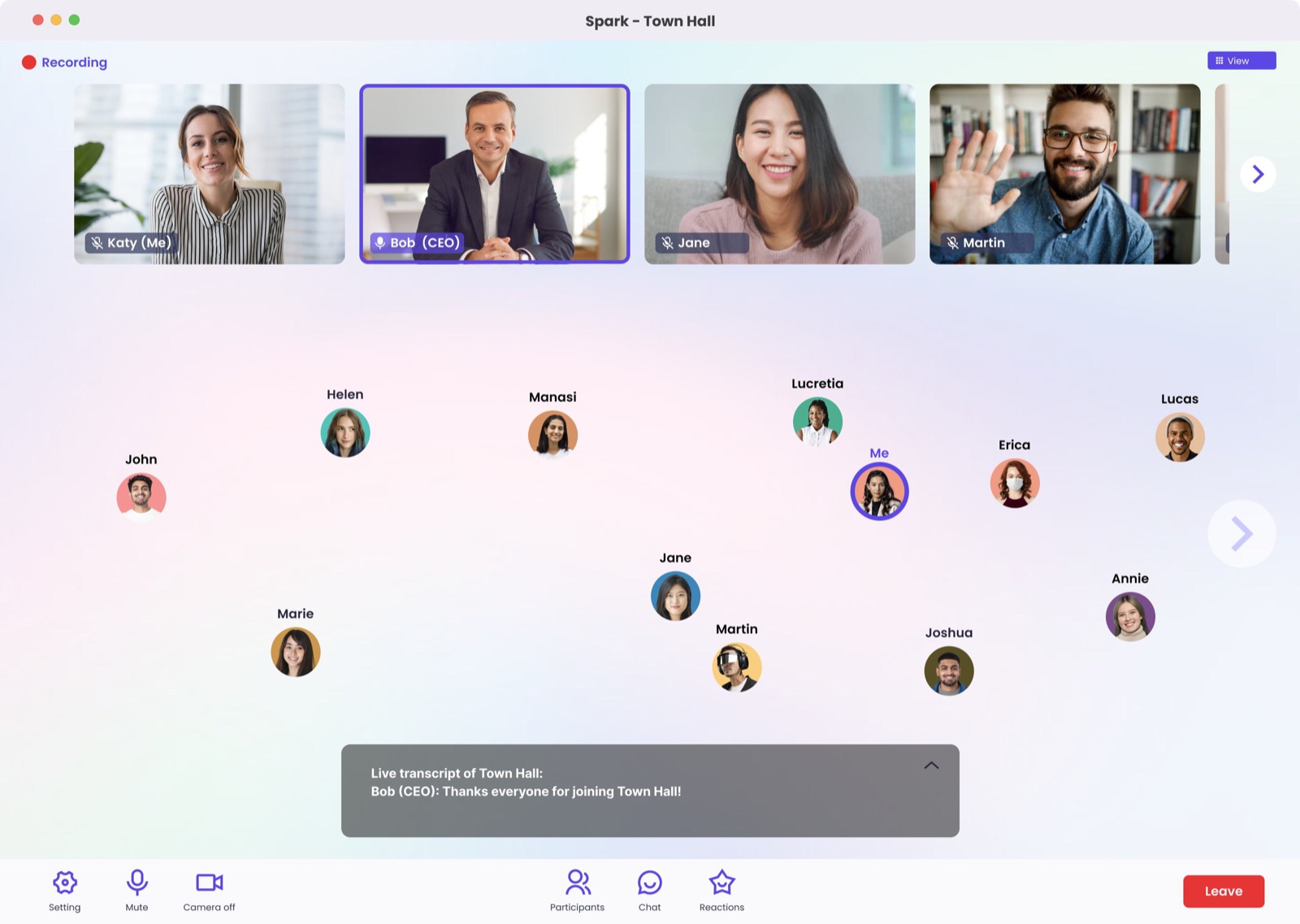
Social Mode
Drop into a bubble group, turn audio/video on or off at any time, and message one or more people without leaving the lobby.
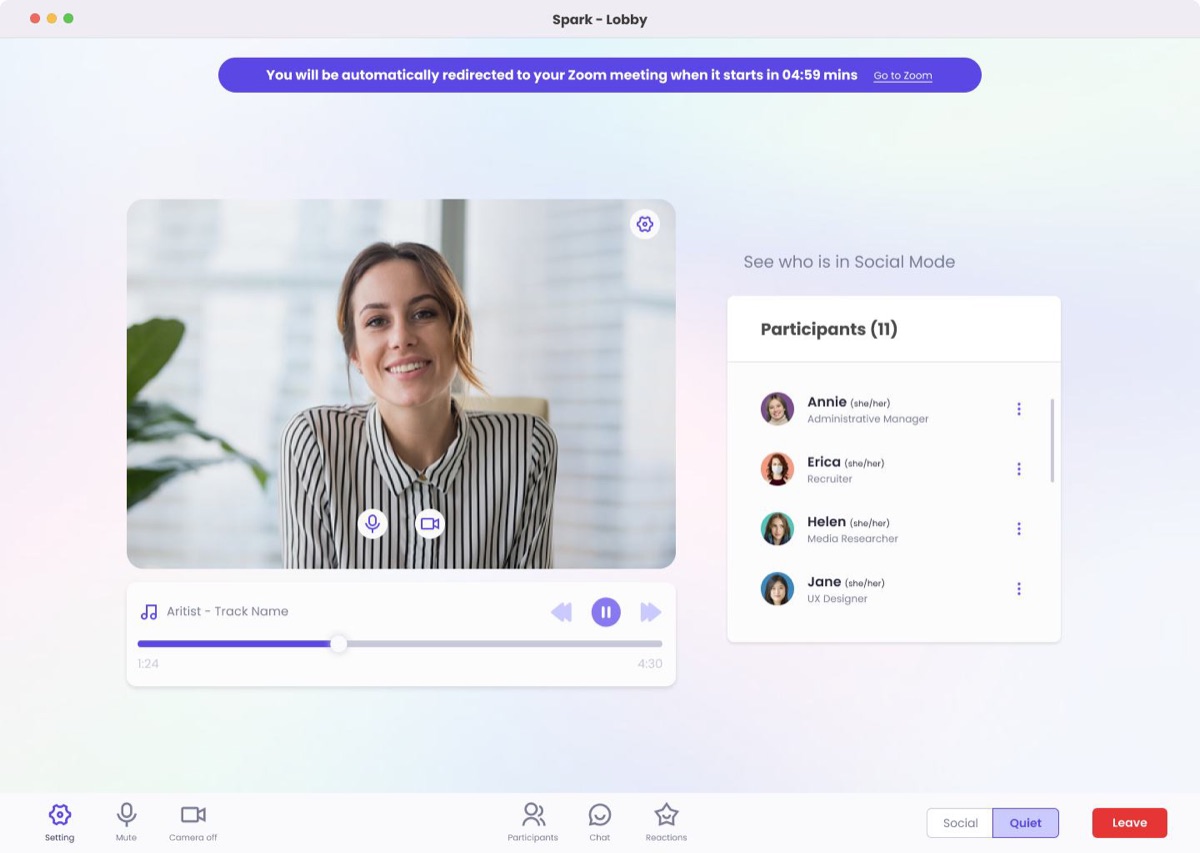
Quiet Mode
Set up your camera and mic, listen to music, and see who's already socializing — switch over whenever you're ready.
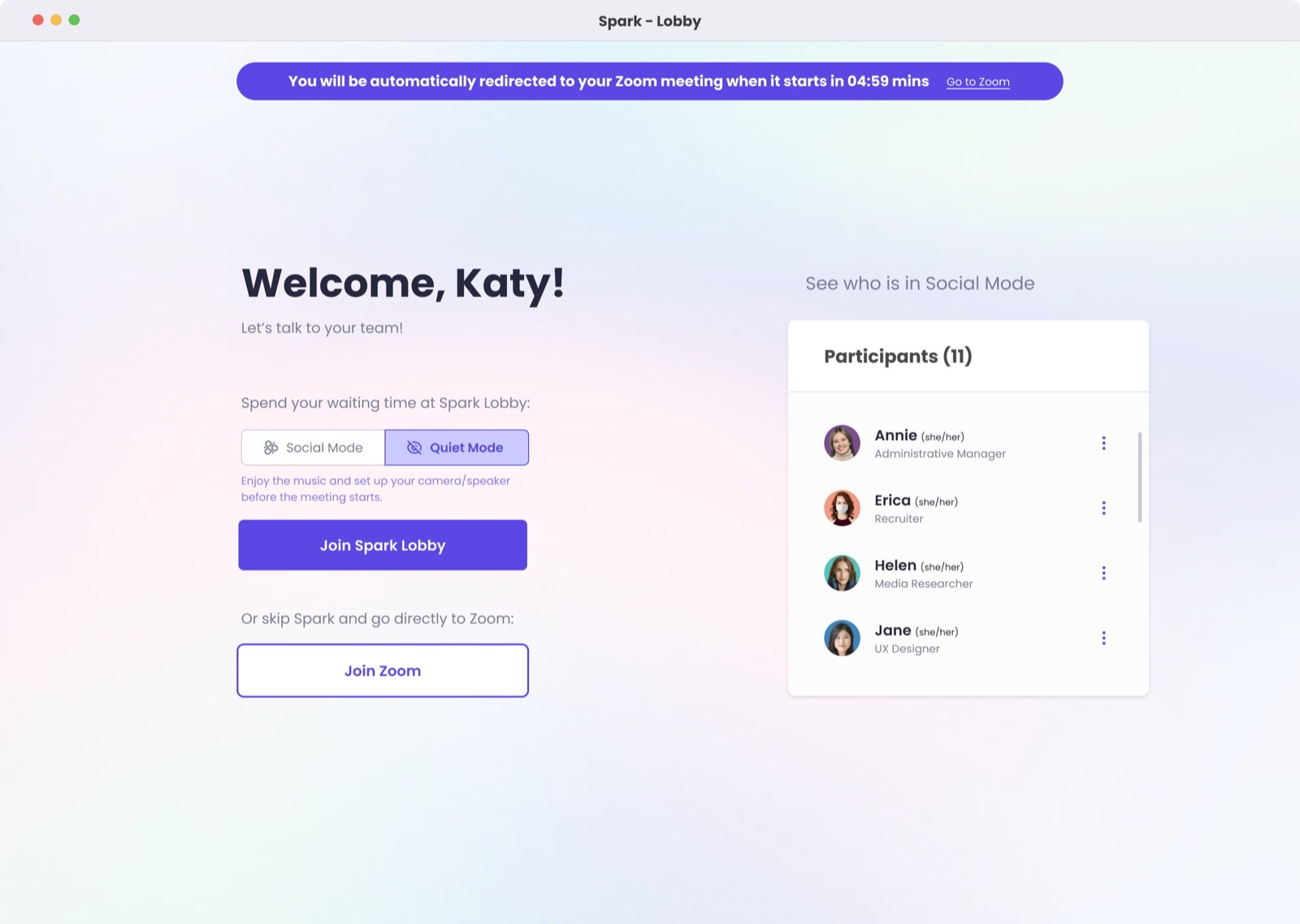
Zoom workflow integration
Join Spark Lobby, and you're automatically redirected into Zoom the moment the meeting starts — or skip straight to Zoom if you'd rather.
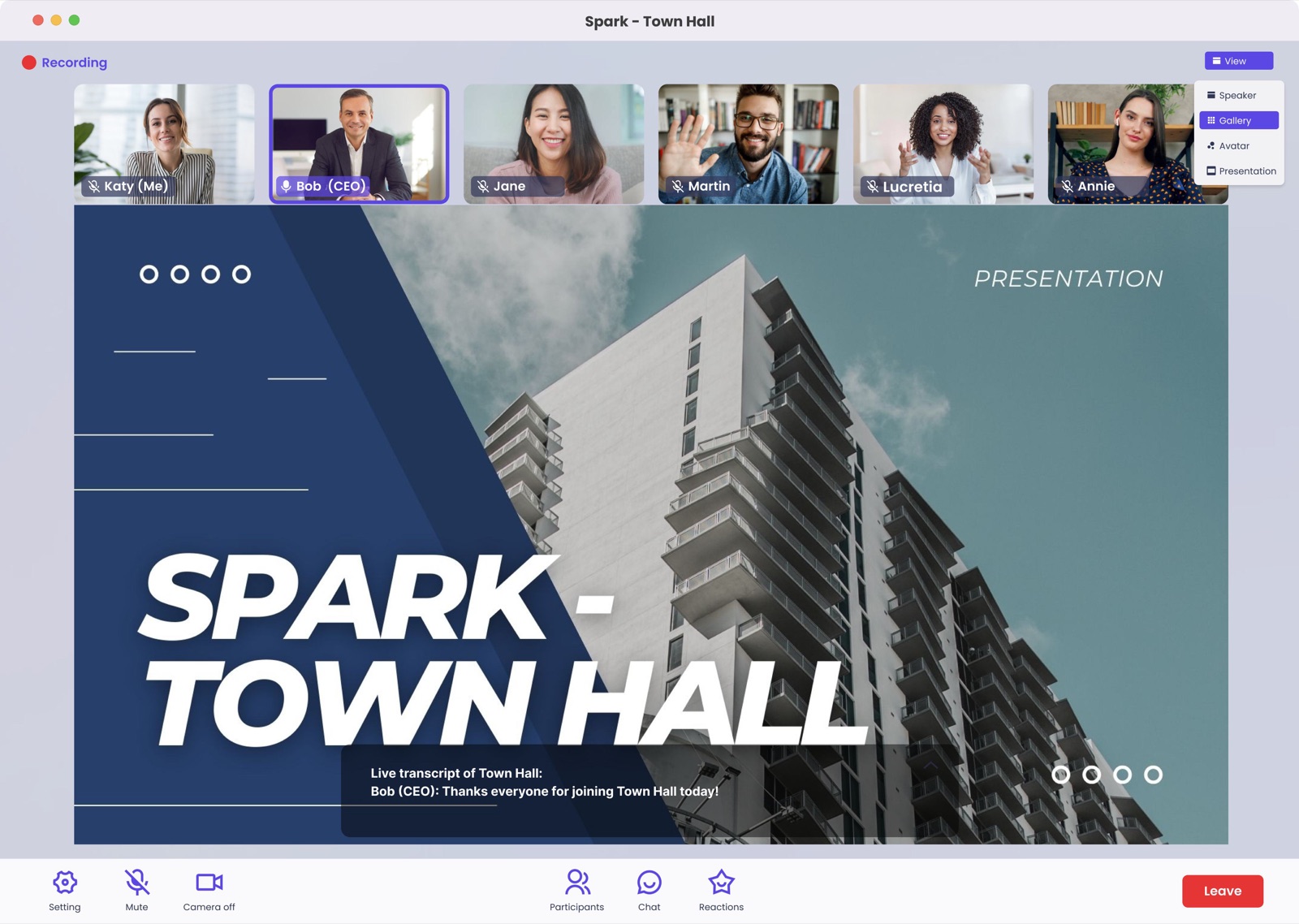
Presentation view
Switch between avatar, speaker, presentation and gallery views — so a 100-person town hall still feels like a room, not a webinar.
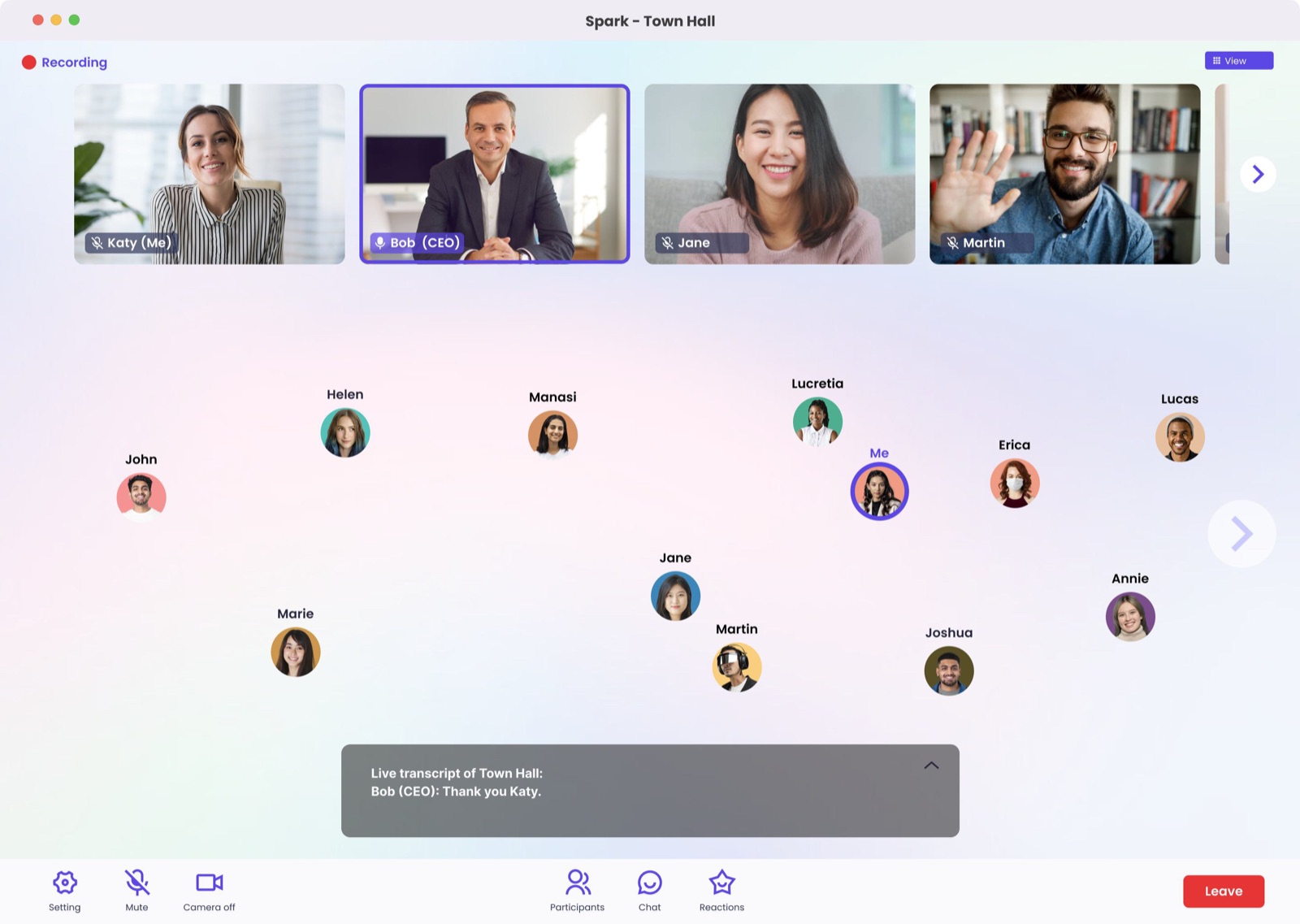
During the event
Unmute to address the whole meeting, send chat messages, or react with emoji — without losing the spatial sense of who's around.
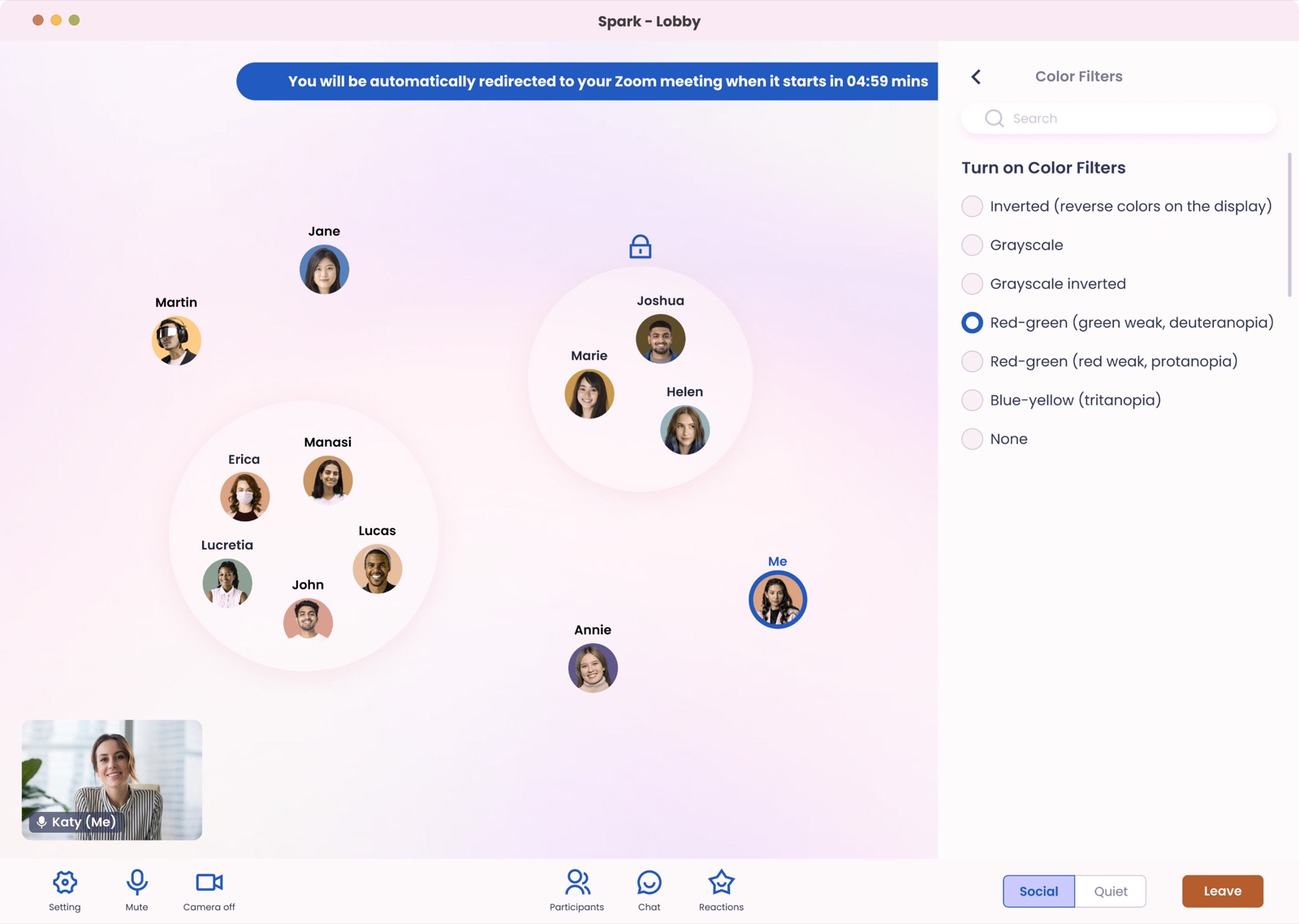
Accessibility
Live transcripts, adjustable font sizes, and color-filter options (including options for color-blindness) built in from the start.
...this is like the old watercooler chats. So we are getting together, getting ready to go into a meeting, and we have a chance to just chat it up a little bit before we start. I like the social component.
TEECOM employee, usability session
I think there's a big opportunity for us at TEECOM to interact on a more human-to-human basis versus purely work-related — and this would be a great tool to encourage people to start doing it.
TEECOM leadership feedback
Across testing, the UX read as intuitive and logical — "nothing out of place," with "a natural flow to it." Several participants said they'd start joining meetings early specifically because Spark gave them a reason to.
New-hire highlight
A subtle color ring around new hires' avatars (under one year at TEECOM) to make it easier — and less awkward — for others to recognize and approach them.
Bubble-group sound cue
A gentle sound when someone starts a bubble group with you, so distracted users aren't startled by an unexpected conversation.
Interest groups
A lighter-weight alternative to Slack channels people "always wait for someone else to post in" — shared spaces around shared interests.
Audio-first accessibility
For blind users: ask Spark "who's nearby?" and hear names announced, with volume indicating relative distance as avatars move closer.